2026年2月更新,Step to UEFI 文章索引:
做一个 UEFI 下的 EasyX 图形库(11)
增加裁剪区域相关的几个函数:
// ---------------------------------------------------------------------------
// 剪裁区域(P0+)
// ---------------------------------------------------------------------------

//
// 剪裁区域对象(对应 EasyX 的 RECT)。
//
typedef struct {
  INT32  left;     // 左上角 X
  INT32  top;      // 左上角 Y
  INT32  right;    // 右下角 X
  INT32  bottom;   // 右下角 Y
} RECT;

/**
  设置剪裁区域。后续所有绘图操作都限制在此矩形内。

  @param[in]  Left    左上角 X 坐标。
  @param[in]  Top     左上角 Y 坐标。
  @param[in]  Right   右下角 X 坐标(含边界)。
  @param[in]  Bottom  右下角 Y 坐标(含边界)。

  说明:
  - 坐标为逻辑坐标(受 setorigin 影响)。
  - 剪裁区域与绘图目标的交集才是最终有效绘图区。
  - 传入的矩形自动规范化(Left 必 < Right,Top 必 < Bottom)。
**/
VOID
EFIAPI
setcliprgn (
  IN INT32  Left,
  IN INT32  Top,
  IN INT32  Right,
  IN INT32  Bottom
  );

/**
  获取当前剪裁区域。

  @param[out]  pRect  输出剪裁矩形,若剪裁未启用则返回全屏矩形。
**/
VOID
EFIAPI
getcliprgn (
  OUT RECT  *pRect
  );

/**
  清除剪裁区域(恢复全屏绘图)。
**/
VOID
EFIAPI
clearcliprgn (
  VOID
  );
运行结果(之前演示使用最大分辨率,这里修改为 1024x768)
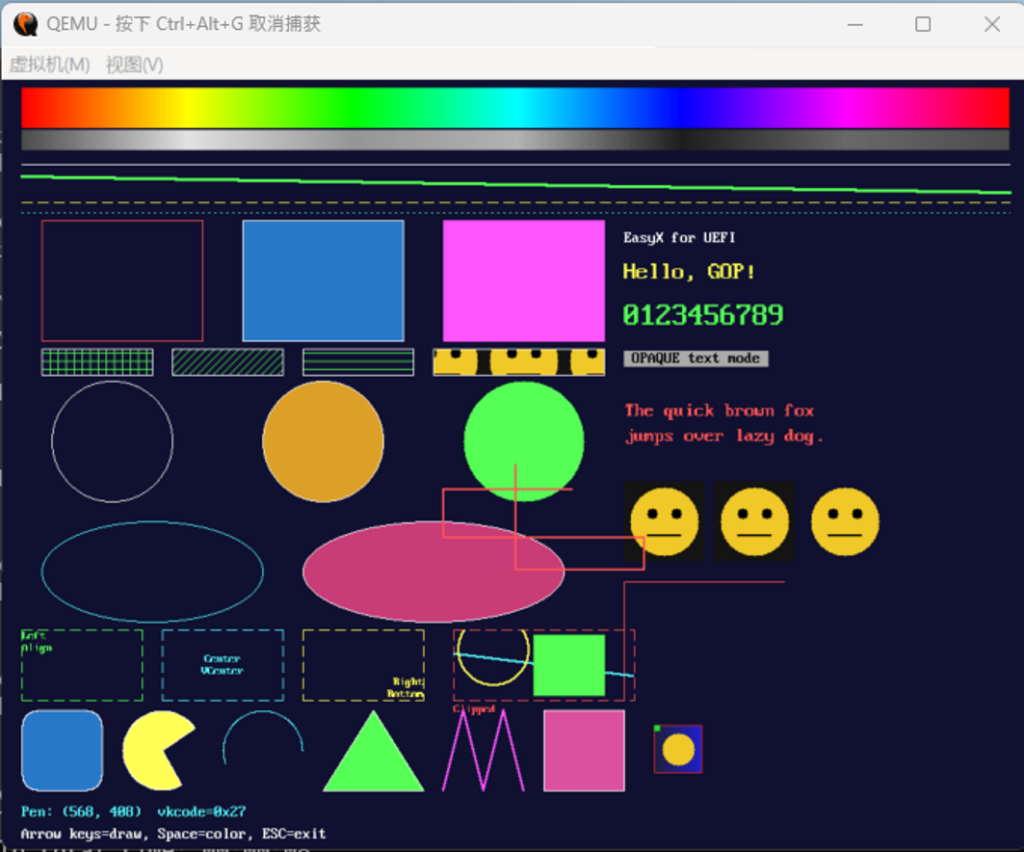
完整代码和 EFI 在这里下载:
做一个 UEFI 下的 EasyX 图形库(10)
增加drawtext() 函数,在一个矩形框中绘制文本。
/**
  在矩形区域内输出文本,支持自动换行和多行对齐。

  @param[in]  X       矩形左上角 X 坐标。
  @param[in]  Y       矩形左上角 Y 坐标。
  @param[in]  W       矩形宽度(像素)。
  @param[in]  H       矩形高度(像素)。
  @param[in]  Text    ASCII 文本(\n 为换行符)。
  @param[in]  Format  对齐选项(DT_LEFT/CENTER/RIGHT | DT_TOP/VCENTER/BOTTOM |
                      DT_WORDBREAK/SINGLELINE 的组合)。

  @return 返回实际绘制的文本高度(像素);若文本超出矩形则返回所需高度。

  说明:
  - 默认不自动换行,文本超过矩形宽度被裁剪。
  - DT_WORDBREAK 启用自动换行:遇矩形边界或 \n 则换行。
  - DT_SINGLELINE 不处理 \n,忽略多行。
  - 文本超过矩形高度不再绘制但仍计算高度返回(便于调整高度)。
**/
INT32
EFIAPI
drawtext (
  IN INT32        X,
  IN INT32        Y,
  IN INT32        W,
  IN INT32        H,
  IN CONST CHAR8  *Text,
  IN UINT32       Format
  );
效果如下:
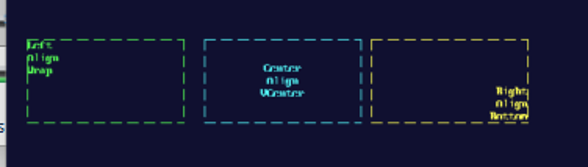
完整的代码和编译后的 EFI 在这里下载:
做一个 UEFI 下的 EasyX 图形库(9)
增加了显示 BMP 的函数,注意这个函数只能加载内存中的BMP ,不能加载文件形式的。
/**
  从内存中的 BMP 数据加载图像(支持 24/32 位、未压缩 BI_RGB)。

  与 EasyX 的 loadimage(从文件读取)不同,此处从内存缓冲加载,避免依赖
  文件系统——可把 BMP 以字节数组内嵌到头文件中再传入。

  @param[out]  DstImg   目标图像(使用前须清零,如 IMAGE img = { 0, 0, NULL };)。
  @param[in]   BmpData  BMP 文件的内存起始地址。
  @param[in]   BmpSize  BMP 数据字节数。

  @retval EFI_SUCCESS   解码成功。
  @retval 其它          参数非法或格式不支持。
**/
EFI_STATUS
EFIAPI
loadimage (
  OUT IMAGE       *DstImg,
  IN  CONST VOID  *BmpData,
  IN  UINTN       BmpSize
  );
这里假定要显示的 BMP 是放在内存中的,实例代码显示的 BMP 是已经定义在"SampleBmp.h"中的图片。
#include <Uefi.h>
#include <Library/UefiBootServicesTableLib.h>
#include <Library/UefiLib.h>
#include <Library/PrintLib.h>
#include "easyx.h"
#include "SampleBmp.h"

/**
  程序入口。
**/
EFI_STATUS
EFIAPI
UefiMain (
  IN EFI_HANDLE        ImageHandle,
  IN EFI_SYSTEM_TABLE  *SystemTable
  )
{
  EFI_STATUS  Status;
  INT32       W;
  INT32       H;
  INT32       PenX;
  INT32       PenY;
  IMAGE       Sprite  = { 0, 0, NULL };   // 使用前必须清零
  IMAGE       Grabbed = { 0, 0, NULL };   // getimage 会读取 Buffer 判断是否需释放
  IMAGE       BmpPic  = { 0, 0, NULL };   // loadimage 目标
  ExMessage   Msg;
  BOOLEAN     Running;
  UINTN       ColorIndex;
  CHAR8       StatusBuf[96];
  CONST COLORREF  Palette[] = {
    LIGHTRED, LIGHTGREEN, LIGHTCYAN, YELLOW, LIGHTMAGENTA, WHITE
  };

  //
  // 初始化绘图设备(跟随 GOP 最大分辨率模式)。
  //
  Status = initgraph (0, 0);
  if (EFI_ERROR (Status)) {
    Print (L"initgraph 失败: %r\n", Status);
    return Status;
  }

  W = getwidth ();
  H = getheight ();

  //
  // 批量绘图,减少刷新次数。
  //
  BeginBatchDraw ();

  //
  // 背景填充深蓝。
  //
  setbkcolor (RGB (16, 16, 48));
  cleardevice ();

  //
  // 颜色模型演示:顶部粗大 HSV 彩虹条 + 其灰度条(RGBtoGRAY)。
  //
  {
    INT32  Px;

    setlinestyle (PS_SOLID, 1);
    for (Px = 20; Px < W - 20; Px++) {
      INT32     Hue = (Px - 20) * 360 / (W - 40);
      COLORREF  Rainbow = HSVtoRGB (Hue % 360, 100, 100);

      setlinecolor (Rainbow);
      line (Px, 8, Px, 47);          // 彩虹条:40 像素高

      setlinecolor (RGBtoGRAY (Rainbow));
      line (Px, 50, Px, 69);         // 灰度条:20 像素高
    }
  }

  //
  // 直线:不同颜色/线宽/线型(下移,为彩虹条让位)。
  //
  setlinecolor (WHITE);
  setlinestyle (PS_SOLID, 1);
  line (20, 84, W - 20, 84);

  setlinecolor (LIGHTGREEN);
  setlinestyle (PS_SOLID, 3);
  line (20, 96, W - 20, 112);

  setlinecolor (YELLOW);
  setlinestyle (PS_DASH, 1);
  line (20, 122, W - 20, 122);

  setlinecolor (LIGHTCYAN);
  setlinestyle (PS_DOT, 1);
  line (20, 132, W - 20, 132);

  //
  // 矩形。
  //
  setlinestyle (PS_SOLID, 1);
  setlinecolor (LIGHTRED);
  rectangle (40, 140, 200, 260);

  setfillcolor (RGB (40, 120, 200));
  setlinecolor (WHITE);
  fillrectangle (240, 140, 400, 260);

  setfillcolor (LIGHTMAGENTA);
  solidrectangle (440, 140, 600, 260);

  //
  // setfillstyle 影线填充演示(fill* 系列会遵循填充样式)。
  //
  setlinecolor (WHITE);
  setlinestyle (PS_SOLID, 1);
  setfillcolor (LIGHTGREEN);
  setbkmode (TRANSPARENT);                       // 影线之间保留背景
  setfillstyle (BS_HATCHED, HS_CROSS, NULL);
  fillrectangle (40, 268, 150, 294);
  setfillstyle (BS_HATCHED, HS_FDIAGONAL, NULL);
  fillrectangle (170, 268, 280, 294);
  setfillstyle (BS_HATCHED, HS_HORIZONTAL, NULL);
  fillrectangle (300, 268, 410, 294);
  setfillstyle (BS_SOLID, HS_CROSS, NULL);       // 复位为纯色填充

  //
  // 圆。
  //
  setlinecolor (WHITE);
  circle (110, 360, 60);

  setfillcolor (RGB (220, 160, 40));
  setlinecolor (WHITE);
  fillcircle (320, 360, 60);

  setfillcolor (LIGHTGREEN);
  solidcircle (520, 360, 60);

  //
  // 椭圆。
  //
  setlinecolor (LIGHTCYAN);
  ellipse (40, 440, 260, 540);

  setfillcolor (RGB (200, 60, 120));
  setlinecolor (WHITE);
  fillellipse (300, 440, 560, 540);

  //
  // 文字(P2):不同颜色/大小/背景模式。
  //
  settextcolor (WHITE);
  settextstyle (16, 8);
  outtextxy (620, 150, "EasyX for UEFI");

  settextcolor (YELLOW);
  settextstyle (24, 0);            // 高 24,宽按比例
  outtextxy (620, 180, "Hello, GOP!");

  settextcolor (LIGHTGREEN);
  settextstyle (32, 16);
  setbkmode (TRANSPARENT);
  outtextxy (620, 220, "0123456789");

  settextcolor (BLACK);
  setbkcolor (LIGHTGRAY);
  setbkmode (OPAQUE);
  settextstyle (16, 8);
  outtextxy (620, 270, " OPAQUE text mode ");

  setbkmode (TRANSPARENT);
  settextcolor (LIGHTRED);
  settextstyle (20, 10);
  outtextxy (620, 320, "The quick brown fox");
  outtextxy (620, 345, "jumps over lazy dog.");

  //
  // 图像(P3)。
  //
  // 1) 用 SetWorkingImage 把绘图重定向到内存图像,绘制一个“精灵”。
  //
  if (!EFI_ERROR (CreateImage (&Sprite, 80, 80))) {
    SetWorkingImage (&Sprite);

    setbkcolor (RGB (20, 20, 20));
    cleardevice ();
    setfillcolor (RGB (240, 200, 40));
    solidcircle (40, 40, 34);
    setfillcolor (BLACK);
    solidcircle (28, 32, 5);
    solidcircle (52, 32, 5);
    setlinecolor (BLACK);
    setlinestyle (PS_SOLID, 2);
    line (24, 54, 56, 54);

    SetWorkingImage (NULL);   // 恢复到屏幕

    // 2) 直接覆盖绘制到屏幕多个位置。
    putimage (620, 400, &Sprite);
    putimage (710, 400, &Sprite);

    // 3) 透明贴图:跳过图像四角的深灰背景色。
    putimagetrans (800, 400, &Sprite, RGB (20, 20, 20));
  }

  //
  // 4) getimage:抓取屏幕左上角一块区域,复制到别处。
  //
  if (!EFI_ERROR (getimage (&Grabbed, 40, 140, 160, 120))) {
    putimage (620, 500, &Grabbed);
    DeleteImage (&Grabbed);
  }

  //
  // setfillstyle 图案填充演示:用精灵图平铺填充一个矩形。
  //
  if (Sprite.Buffer != NULL) {
    setlinecolor (WHITE);
    setlinestyle (PS_SOLID, 1);
    setfillstyle (BS_PATTERN, 0, &Sprite);
    fillrectangle (430, 268, 600, 294);
    setfillstyle (BS_SOLID, 0, NULL);            // 复位为纯色填充
  }

  DeleteImage (&Sprite);

  //
  // 高级图形(P5):底部一条演示带(先清出干净背景)。
  //
  {
    INT32  Y0 = H - 150;

    setfillcolor (RGB (16, 16, 48));
    solidrectangle (0, Y0 - 10, W - 1, Y0 + 100);

    // 圆角矩形(边框 + 填充)
    setlinestyle (PS_SOLID, 1);
    setlinecolor (WHITE);
    setfillcolor (RGB (40, 120, 200));
    fillroundrect (30, Y0, 150, Y0 + 90, 40, 40);

    // 扇形(吃豆人)
    setfillcolor (YELLOW);
    fillpie (170, Y0, 290, Y0 + 90, 35, 300);

    // 圆弧
    setlinecolor (LIGHTCYAN);
    arc (310, Y0, 430, Y0 + 90, 0, 200);

    // 多边形(三角形,边框 + 填充)
    setlinecolor (WHITE);
    setfillcolor (LIGHTGREEN);
    {
      POINT  Tri[3] = {
        { 450, Y0 + 90 },
        { 510, Y0      },
        { 570, Y0 + 90 }
      };
      fillpolygon (Tri, 3);
    }

    // 折线(锯齿)
    setlinecolor (LIGHTMAGENTA);
    setlinestyle (PS_SOLID, 2);
    {
      POINT  Zig[5] = {
        { 590, Y0 + 90 },
        { 610, Y0      },
        { 630, Y0 + 90 },
        { 650, Y0      },
        { 670, Y0 + 90 }
      };
      polyline (Zig, 5);
    }

    // 区域填充:先画空心矩形,再对内部 floodfill
    setlinestyle (PS_SOLID, 1);
    setlinecolor (WHITE);
    rectangle (700, Y0, 800, Y0 + 90);
    setfillcolor (RGB (220, 80, 160));
    floodfill (750, Y0 + 45, RGB (16, 16, 48));

    // loadimage:显示内嵌头文件中的真实 BMP(48x48)
    if (!EFI_ERROR (loadimage (&BmpPic, gSampleBmp, sizeof (gSampleBmp)))) {
      putimage (820, Y0 + 20, &BmpPic);
      DeleteImage (&BmpPic);
    }
  }

  //
  // 键盘操作提示。
  //
  setbkmode (TRANSPARENT);
  settextcolor (WHITE);
  settextstyle (16, 8);
  outtextxy (20, H - 24, "Arrow keys=draw, Space=color, ESC=exit");

  //
  // 一次性刷新并结束批量绘图。
  //
  EndBatchDraw ();

  //
  // 键盘交互循环(P4):方向键移动画笔绘线。
  //
  PenX       = W / 2;
  PenY       = H / 2;
  Running    = TRUE;
  ColorIndex = 0;
  while (Running) {
    INT32  NewX;
    INT32  NewY;

    getmessage (&Msg, EX_KEY);

    if (Msg.message != WM_KEYDOWN) {
      continue;
    }

    NewX = PenX;
    NewY = PenY;

    switch (Msg.vkcode) {
      case VK_LEFT:   NewX -= 8; break;
      case VK_RIGHT:  NewX += 8; break;
      case VK_UP:     NewY -= 8; break;
      case VK_DOWN:   NewY += 8; break;
      case VK_SPACE:  ColorIndex++; break;
      case VK_ESCAPE: Running = FALSE; break;
      default:        break;
    }

    if (!Running) {
      break;
    }

    //
    // 夹取到屏幕范围内。
    //
    if (NewX < 0) {
      NewX = 0;
    }

    if (NewY < 0) {
      NewY = 0;
    }

    if (NewX > W - 1) {
      NewX = W - 1;
    }

    if (NewY > H - 1) {
      NewY = H - 1;
    }

    //
    // 从旧位置到新位置画一段线。
    //
    setlinecolor (Palette[ColorIndex % (sizeof (Palette) / sizeof (Palette[0]))]);
    setlinestyle (PS_SOLID, 2);
    line (PenX, PenY, NewX, NewY);
    PenX = NewX;
    PenY = NewY;

    //
    // 底部显示当前画笔位置与按键(先用背景色清除旧文字)。
    //
    setfillcolor (RGB (16, 16, 48));
    solidrectangle (20, H - 48, 420, H - 28);
    AsciiSPrint (
      StatusBuf,
      sizeof (StatusBuf),
      "Pen: (%d, %d)  vkcode=0x%02x",
      PenX,
      PenY,
      Msg.vkcode
      );
    setbkmode (TRANSPARENT);
    settextcolor (LIGHTCYAN);
    settextstyle (16, 8);
    outtextxy (20, H - 46, StatusBuf);
  }

  closegraph ();

  //
  // 恢复文本控制台。
  //
  gST->ConOut->ClearScreen (gST->ConOut);
  Print (L"EasyX UEFI Demo 结束。分辨率: %d x %d\n", W, H);

  return EFI_SUCCESS;
}
运行之后,图片是显示在最下面的的最右侧:
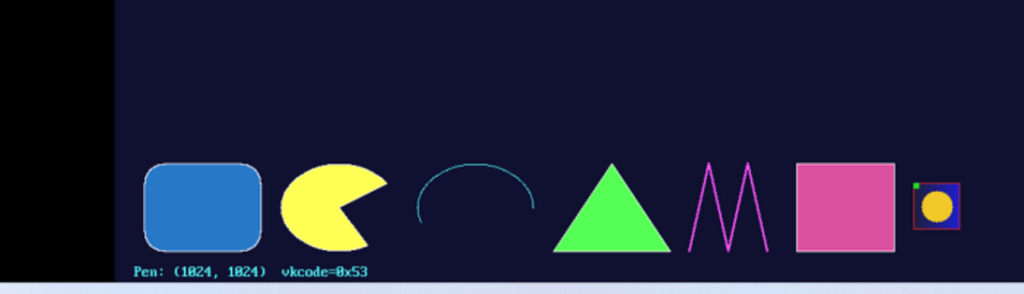
最终的代码和编译后的 EFI 如下:
做一个 UEFI 下的 EasyX 图形库(8)
增加了填充样式功能。
测试代码:
#include <Uefi.h>
#include <Library/UefiBootServicesTableLib.h>
#include <Library/UefiLib.h>
#include <Library/PrintLib.h>
#include "easyx.h"

/**
  程序入口。
**/
EFI_STATUS
EFIAPI
UefiMain (
  IN EFI_HANDLE        ImageHandle,
  IN EFI_SYSTEM_TABLE  *SystemTable
  )
{
  EFI_STATUS  Status;
  INT32       W;
  INT32       H;
  INT32       PenX;
  INT32       PenY;
  IMAGE       Sprite  = { 0, 0, NULL };   // 使用前必须清零
  IMAGE       Grabbed = { 0, 0, NULL };   // getimage 会读取 Buffer 判断是否需释放
  ExMessage   Msg;
  BOOLEAN     Running;
  UINTN       ColorIndex;
  CHAR8       StatusBuf[96];
  CONST COLORREF  Palette[] = {
    LIGHTRED, LIGHTGREEN, LIGHTCYAN, YELLOW, LIGHTMAGENTA, WHITE
  };

  //
  // 初始化绘图设备(跟随 GOP 最大分辨率模式)。
  //
  Status = initgraph (0, 0);
  if (EFI_ERROR (Status)) {
    Print (L"initgraph 失败: %r\n", Status);
    return Status;
  }

  W = getwidth ();
  H = getheight ();

  //
  // 批量绘图,减少刷新次数。
  //
  BeginBatchDraw ();

  //
  // 背景填充深蓝。
  //
  setbkcolor (RGB (16, 16, 48));
  cleardevice ();

  //
  // 颜色模型演示:顶部粗大 HSV 彩虹条 + 其灰度条(RGBtoGRAY)。
  //
  {
    INT32  Px;

    setlinestyle (PS_SOLID, 1);
    for (Px = 20; Px < W - 20; Px++) {
      INT32     Hue = (Px - 20) * 360 / (W - 40);
      COLORREF  Rainbow = HSVtoRGB (Hue % 360, 100, 100);

      setlinecolor (Rainbow);
      line (Px, 8, Px, 47);          // 彩虹条:40 像素高

      setlinecolor (RGBtoGRAY (Rainbow));
      line (Px, 50, Px, 69);         // 灰度条:20 像素高
    }
  }

  //
  // 直线:不同颜色/线宽/线型(下移,为彩虹条让位)。
  //
  setlinecolor (WHITE);
  setlinestyle (PS_SOLID, 1);
  line (20, 84, W - 20, 84);

  setlinecolor (LIGHTGREEN);
  setlinestyle (PS_SOLID, 3);
  line (20, 96, W - 20, 112);

  setlinecolor (YELLOW);
  setlinestyle (PS_DASH, 1);
  line (20, 122, W - 20, 122);

  setlinecolor (LIGHTCYAN);
  setlinestyle (PS_DOT, 1);
  line (20, 132, W - 20, 132);

  //
  // 矩形。
  //
  setlinestyle (PS_SOLID, 1);
  setlinecolor (LIGHTRED);
  rectangle (40, 140, 200, 260);

  setfillcolor (RGB (40, 120, 200));
  setlinecolor (WHITE);
  fillrectangle (240, 140, 400, 260);

  setfillcolor (LIGHTMAGENTA);
  solidrectangle (440, 140, 600, 260);

  //
  // setfillstyle 影线填充演示(fill* 系列会遵循填充样式)。
  //
  setlinecolor (WHITE);
  setlinestyle (PS_SOLID, 1);
  setfillcolor (LIGHTGREEN);
  setbkmode (TRANSPARENT);                       // 影线之间保留背景
  setfillstyle (BS_HATCHED, HS_CROSS, NULL);
  fillrectangle (40, 268, 150, 294);
  setfillstyle (BS_HATCHED, HS_FDIAGONAL, NULL);
  fillrectangle (170, 268, 280, 294);
  setfillstyle (BS_HATCHED, HS_HORIZONTAL, NULL);
  fillrectangle (300, 268, 410, 294);
  setfillstyle (BS_SOLID, HS_CROSS, NULL);       // 复位为纯色填充

  //
  // 圆。
  //
  setlinecolor (WHITE);
  circle (110, 360, 60);

  setfillcolor (RGB (220, 160, 40));
  setlinecolor (WHITE);
  fillcircle (320, 360, 60);

  setfillcolor (LIGHTGREEN);
  solidcircle (520, 360, 60);

  //
  // 椭圆。
  //
  setlinecolor (LIGHTCYAN);
  ellipse (40, 440, 260, 540);

  setfillcolor (RGB (200, 60, 120));
  setlinecolor (WHITE);
  fillellipse (300, 440, 560, 540);

  //
  // 文字(P2):不同颜色/大小/背景模式。
  //
  settextcolor (WHITE);
  settextstyle (16, 8);
  outtextxy (620, 150, "EasyX for UEFI");

  settextcolor (YELLOW);
  settextstyle (24, 0);            // 高 24,宽按比例
  outtextxy (620, 180, "Hello, GOP!");

  settextcolor (LIGHTGREEN);
  settextstyle (32, 16);
  setbkmode (TRANSPARENT);
  outtextxy (620, 220, "0123456789");

  settextcolor (BLACK);
  setbkcolor (LIGHTGRAY);
  setbkmode (OPAQUE);
  settextstyle (16, 8);
  outtextxy (620, 270, " OPAQUE text mode ");

  setbkmode (TRANSPARENT);
  settextcolor (LIGHTRED);
  settextstyle (20, 10);
  outtextxy (620, 320, "The quick brown fox");
  outtextxy (620, 345, "jumps over lazy dog.");

  //
  // 图像(P3)。
  //
  // 1) 用 SetWorkingImage 把绘图重定向到内存图像,绘制一个“精灵”。
  //
  if (!EFI_ERROR (CreateImage (&Sprite, 80, 80))) {
    SetWorkingImage (&Sprite);

    setbkcolor (RGB (20, 20, 20));
    cleardevice ();
    setfillcolor (RGB (240, 200, 40));
    solidcircle (40, 40, 34);
    setfillcolor (BLACK);
    solidcircle (28, 32, 5);
    solidcircle (52, 32, 5);
    setlinecolor (BLACK);
    setlinestyle (PS_SOLID, 2);
    line (24, 54, 56, 54);

    SetWorkingImage (NULL);   // 恢复到屏幕

    // 2) 直接覆盖绘制到屏幕多个位置。
    putimage (620, 400, &Sprite);
    putimage (710, 400, &Sprite);

    // 3) 透明贴图:跳过图像四角的深灰背景色。
    putimagetrans (800, 400, &Sprite, RGB (20, 20, 20));
  }

  //
  // 4) getimage:抓取屏幕左上角一块区域,复制到别处。
  //
  if (!EFI_ERROR (getimage (&Grabbed, 40, 140, 160, 120))) {
    putimage (620, 500, &Grabbed);
    DeleteImage (&Grabbed);
  }

  //
  // setfillstyle 图案填充演示:用精灵图平铺填充一个矩形。
  //
  if (Sprite.Buffer != NULL) {
    setlinecolor (WHITE);
    setlinestyle (PS_SOLID, 1);
    setfillstyle (BS_PATTERN, 0, &Sprite);
    fillrectangle (430, 268, 600, 294);
    setfillstyle (BS_SOLID, 0, NULL);            // 复位为纯色填充
  }

  DeleteImage (&Sprite);

  //
  // 高级图形(P5):底部一条演示带(先清出干净背景)。
  //
  {
    INT32  Y0 = H - 150;

    setfillcolor (RGB (16, 16, 48));
    solidrectangle (0, Y0 - 10, W - 1, Y0 + 100);

    // 圆角矩形(边框 + 填充)
    setlinestyle (PS_SOLID, 1);
    setlinecolor (WHITE);
    setfillcolor (RGB (40, 120, 200));
    fillroundrect (30, Y0, 150, Y0 + 90, 40, 40);

    // 扇形(吃豆人)
    setfillcolor (YELLOW);
    fillpie (170, Y0, 290, Y0 + 90, 35, 300);

    // 圆弧
    setlinecolor (LIGHTCYAN);
    arc (310, Y0, 430, Y0 + 90, 0, 200);

    // 多边形(三角形,边框 + 填充)
    setlinecolor (WHITE);
    setfillcolor (LIGHTGREEN);
    {
      POINT  Tri[3] = {
        { 450, Y0 + 90 },
        { 510, Y0      },
        { 570, Y0 + 90 }
      };
      fillpolygon (Tri, 3);
    }

    // 折线(锯齿)
    setlinecolor (LIGHTMAGENTA);
    setlinestyle (PS_SOLID, 2);
    {
      POINT  Zig[5] = {
        { 590, Y0 + 90 },
        { 610, Y0      },
        { 630, Y0 + 90 },
        { 650, Y0      },
        { 670, Y0 + 90 }
      };
      polyline (Zig, 5);
    }

    // 区域填充:先画空心矩形,再对内部 floodfill
    setlinestyle (PS_SOLID, 1);
    setlinecolor (WHITE);
    rectangle (700, Y0, 800, Y0 + 90);
    setfillcolor (RGB (220, 80, 160));
    floodfill (750, Y0 + 45, RGB (16, 16, 48));
  }

  //
  // 键盘操作提示。
  //
  setbkmode (TRANSPARENT);
  settextcolor (WHITE);
  settextstyle (16, 8);
  outtextxy (20, H - 24, "Arrow keys=draw, Space=color, ESC=exit");

  //
  // 一次性刷新并结束批量绘图。
  //
  EndBatchDraw ();

  //
  // 键盘交互循环(P4):方向键移动画笔绘线。
  //
  PenX       = W / 2;
  PenY       = H / 2;
  Running    = TRUE;
  ColorIndex = 0;
  while (Running) {
    INT32  NewX;
    INT32  NewY;

    getmessage (&Msg, EX_KEY);

    if (Msg.message != WM_KEYDOWN) {
      continue;
    }

    NewX = PenX;
    NewY = PenY;

    switch (Msg.vkcode) {
      case VK_LEFT:   NewX -= 8; break;
      case VK_RIGHT:  NewX += 8; break;
      case VK_UP:     NewY -= 8; break;
      case VK_DOWN:   NewY += 8; break;
      case VK_SPACE:  ColorIndex++; break;
      case VK_ESCAPE: Running = FALSE; break;
      default:        break;
    }

    if (!Running) {
      break;
    }

    //
    // 夹取到屏幕范围内。
    //
    if (NewX < 0) {
      NewX = 0;
    }

    if (NewY < 0) {
      NewY = 0;
    }

    if (NewX > W - 1) {
      NewX = W - 1;
    }

    if (NewY > H - 1) {
      NewY = H - 1;
    }

    //
    // 从旧位置到新位置画一段线。
    //
    setlinecolor (Palette[ColorIndex % (sizeof (Palette) / sizeof (Palette[0]))]);
    setlinestyle (PS_SOLID, 2);
    line (PenX, PenY, NewX, NewY);
    PenX = NewX;
    PenY = NewY;

    //
    // 底部显示当前画笔位置与按键(先用背景色清除旧文字)。
    //
    setfillcolor (RGB (16, 16, 48));
    solidrectangle (20, H - 48, 420, H - 28);
    AsciiSPrint (
      StatusBuf,
      sizeof (StatusBuf),
      "Pen: (%d, %d)  vkcode=0x%02x",
      PenX,
      PenY,
      Msg.vkcode
      );
    setbkmode (TRANSPARENT);
    settextcolor (LIGHTCYAN);
    settextstyle (16, 8);
    outtextxy (20, H - 46, StatusBuf);
  }

  closegraph ();

  //
  // 恢复文本控制台。
  //
  gST->ConOut->ClearScreen (gST->ConOut);
  Print (L"EasyX UEFI Demo 结束。分辨率: %d x %d\n", W, H);

  return EFI_SUCCESS;
}
运行结果:
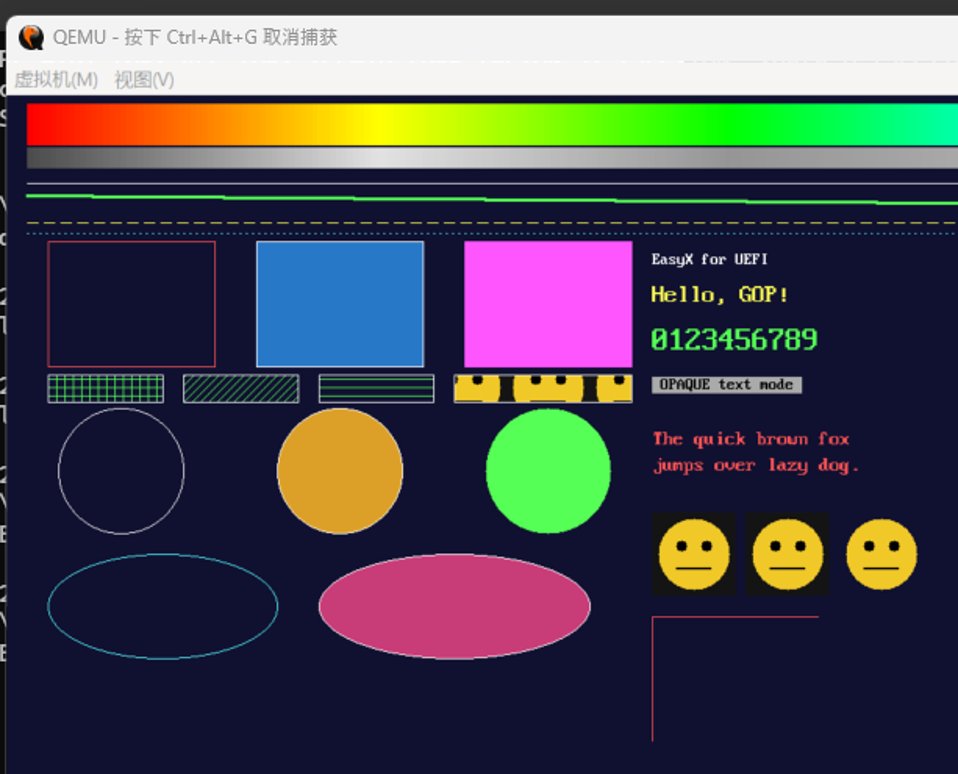
完整代码:
做一个 UEFI 下的 EasyX 图形库(7)
继续修改代码,增加辅助函数:
/**
  忙等待指定微秒数(基于 gBS->Stall)。
**/
VOID
EFIAPI
delay_us (
  IN UINT32  Microseconds
  );

/**
  忙等待指定毫秒数。
**/
VOID
EFIAPI
delay_ms (
  IN UINT32  Milliseconds
  );

/**
  忙等待指定毫秒数(delay_ms 的别名,便于移植 EasyX 代码)。
**/
VOID
EFIAPI
Sleep (
  IN UINT32  Milliseconds
  );
测试代码增加了一个开场动画,绘制一个弹跳的小球:
#include <Uefi.h>
#include <Library/UefiBootServicesTableLib.h>
#include <Library/UefiLib.h>
#include <Library/PrintLib.h>
#include "easyx.h"

/**
  程序入口。
**/
EFI_STATUS
EFIAPI
UefiMain (
  IN EFI_HANDLE        ImageHandle,
  IN EFI_SYSTEM_TABLE  *SystemTable
  )
{
  EFI_STATUS  Status;
  INT32       W;
  INT32       H;
  INT32       PenX;
  INT32       PenY;
  IMAGE       Sprite  = { 0, 0, NULL };   // 使用前必须清零
  IMAGE       Grabbed = { 0, 0, NULL };   // getimage 会读取 Buffer 判断是否需释放
  ExMessage   Msg;
  BOOLEAN     Running;
  UINTN       ColorIndex;
  CHAR8       StatusBuf[96];
  CONST COLORREF  Palette[] = {
    LIGHTRED, LIGHTGREEN, LIGHTCYAN, YELLOW, LIGHTMAGENTA, WHITE
  };

  //
  // 初始化绘图设备(跟随 GOP 最大分辨率模式)。
  //
  Status = initgraph (0, 0);
  if (EFI_ERROR (Status)) {
    Print (L"initgraph 失败: %r\n", Status);
    return Status;
  }

  W = getwidth ();
  H = getheight ();

  //
  // 开场动画:弹跳小球(演示 delay_ms + 双缓冲 BeginBatchDraw/FlushBatchDraw)。
  //
  {
    INT32  Bx = W / 2;
    INT32  By = H / 3;
    INT32  Vx = 7;
    INT32  Vy = 5;
    INT32  Rr = 30;
    INT32  Frame;

    BeginBatchDraw ();
    for (Frame = 0; Frame < 150; Frame++) {
      setbkcolor (RGB (16, 16, 48));
      cleardevice ();

      setfillcolor (HSVtoRGB ((Frame * 4) % 360, 100, 100));
      solidcircle (Bx, By, Rr);

      setbkmode (TRANSPARENT);
      settextcolor (WHITE);
      settextstyle (28, 14);
      outtextxy (W / 2 - 140, 30, "EasyX for UEFI");

      FlushBatchDraw ();

      Bx += Vx;
      By += Vy;
      if ((Bx - Rr < 0) || (Bx + Rr > W - 1)) {
        Vx = -Vx;
        Bx += Vx;
      }

      if ((By - Rr < 0) || (By + Rr > H - 1)) {
        Vy = -Vy;
        By += Vy;
      }

      delay_ms (16);
    }

    EndBatchDraw ();
  }

  //
  // 批量绘图,减少刷新次数。
  //
  BeginBatchDraw ();

  //
  // 背景填充深蓝。
  //
  setbkcolor (RGB (16, 16, 48));
  cleardevice ();

  //
  // 颜色模型演示:顶部粗大 HSV 彩虹条 + 其灰度条(RGBtoGRAY)。
  //
  {
    INT32  Px;

    setlinestyle (PS_SOLID, 1);
    for (Px = 20; Px < W - 20; Px++) {
      INT32     Hue = (Px - 20) * 360 / (W - 40);
      COLORREF  Rainbow = HSVtoRGB (Hue % 360, 100, 100);

      setlinecolor (Rainbow);
      line (Px, 8, Px, 47);          // 彩虹条:40 像素高

      setlinecolor (RGBtoGRAY (Rainbow));
      line (Px, 50, Px, 69);         // 灰度条:20 像素高
    }
  }

  //
  // 直线:不同颜色/线宽/线型(下移,为彩虹条让位)。
  //
  setlinecolor (WHITE);
  setlinestyle (PS_SOLID, 1);
  line (20, 84, W - 20, 84);

  setlinecolor (LIGHTGREEN);
  setlinestyle (PS_SOLID, 3);
  line (20, 96, W - 20, 112);

  setlinecolor (YELLOW);
  setlinestyle (PS_DASH, 1);
  line (20, 122, W - 20, 122);

  setlinecolor (LIGHTCYAN);
  setlinestyle (PS_DOT, 1);
  line (20, 132, W - 20, 132);

  //
  // 矩形。
  //
  setlinestyle (PS_SOLID, 1);
  setlinecolor (LIGHTRED);
  rectangle (40, 140, 200, 260);

  setfillcolor (RGB (40, 120, 200));
  setlinecolor (WHITE);
  fillrectangle (240, 140, 400, 260);

  setfillcolor (LIGHTMAGENTA);
  solidrectangle (440, 140, 600, 260);

  //
  // 圆。
  //
  setlinecolor (WHITE);
  circle (110, 360, 60);

  setfillcolor (RGB (220, 160, 40));
  setlinecolor (WHITE);
  fillcircle (320, 360, 60);

  setfillcolor (LIGHTGREEN);
  solidcircle (520, 360, 60);

  //
  // 椭圆。
  //
  setlinecolor (LIGHTCYAN);
  ellipse (40, 440, 260, 540);

  setfillcolor (RGB (200, 60, 120));
  setlinecolor (WHITE);
  fillellipse (300, 440, 560, 540);

  //
  // 文字(P2):不同颜色/大小/背景模式。
  //
  settextcolor (WHITE);
  settextstyle (16, 8);
  outtextxy (620, 150, "EasyX for UEFI");

  settextcolor (YELLOW);
  settextstyle (24, 0);            // 高 24,宽按比例
  outtextxy (620, 180, "Hello, GOP!");

  settextcolor (LIGHTGREEN);
  settextstyle (32, 16);
  setbkmode (TRANSPARENT);
  outtextxy (620, 220, "0123456789");

  settextcolor (BLACK);
  setbkcolor (LIGHTGRAY);
  setbkmode (OPAQUE);
  settextstyle (16, 8);
  outtextxy (620, 270, " OPAQUE text mode ");

  setbkmode (TRANSPARENT);
  settextcolor (LIGHTRED);
  settextstyle (20, 10);
  outtextxy (620, 320, "The quick brown fox");
  outtextxy (620, 345, "jumps over lazy dog.");

  //
  // 图像(P3)。
  //
  // 1) 用 SetWorkingImage 把绘图重定向到内存图像,绘制一个“精灵”。
  //
  if (!EFI_ERROR (CreateImage (&Sprite, 80, 80))) {
    SetWorkingImage (&Sprite);

    setbkcolor (RGB (20, 20, 20));
    cleardevice ();
    setfillcolor (RGB (240, 200, 40));
    solidcircle (40, 40, 34);
    setfillcolor (BLACK);
    solidcircle (28, 32, 5);
    solidcircle (52, 32, 5);
    setlinecolor (BLACK);
    setlinestyle (PS_SOLID, 2);
    line (24, 54, 56, 54);

    SetWorkingImage (NULL);   // 恢复到屏幕

    // 2) 直接覆盖绘制到屏幕多个位置。
    putimage (620, 400, &Sprite);
    putimage (710, 400, &Sprite);

    // 3) 透明贴图:跳过图像四角的深灰背景色。
    putimagetrans (800, 400, &Sprite, RGB (20, 20, 20));
  }

  //
  // 4) getimage:抓取屏幕左上角一块区域,复制到别处。
  //
  if (!EFI_ERROR (getimage (&Grabbed, 40, 140, 160, 120))) {
    putimage (620, 500, &Grabbed);
    DeleteImage (&Grabbed);
  }

  DeleteImage (&Sprite);

  //
  // 高级图形(P5):底部一条演示带(先清出干净背景)。
  //
  {
    INT32  Y0 = H - 150;

    setfillcolor (RGB (16, 16, 48));
    solidrectangle (0, Y0 - 10, W - 1, Y0 + 100);

    // 圆角矩形(边框 + 填充)
    setlinestyle (PS_SOLID, 1);
    setlinecolor (WHITE);
    setfillcolor (RGB (40, 120, 200));
    fillroundrect (30, Y0, 150, Y0 + 90, 40, 40);

    // 扇形(吃豆人)
    setfillcolor (YELLOW);
    fillpie (170, Y0, 290, Y0 + 90, 35, 300);

    // 圆弧
    setlinecolor (LIGHTCYAN);
    arc (310, Y0, 430, Y0 + 90, 0, 200);

    // 多边形(三角形,边框 + 填充)
    setlinecolor (WHITE);
    setfillcolor (LIGHTGREEN);
    {
      POINT  Tri[3] = {
        { 450, Y0 + 90 },
        { 510, Y0      },
        { 570, Y0 + 90 }
      };
      fillpolygon (Tri, 3);
    }

    // 折线(锯齿)
    setlinecolor (LIGHTMAGENTA);
    setlinestyle (PS_SOLID, 2);
    {
      POINT  Zig[5] = {
        { 590, Y0 + 90 },
        { 610, Y0      },
        { 630, Y0 + 90 },
        { 650, Y0      },
        { 670, Y0 + 90 }
      };
      polyline (Zig, 5);
    }

    // 区域填充:先画空心矩形,再对内部 floodfill
    setlinestyle (PS_SOLID, 1);
    setlinecolor (WHITE);
    rectangle (700, Y0, 800, Y0 + 90);
    setfillcolor (RGB (220, 80, 160));
    floodfill (750, Y0 + 45, RGB (16, 16, 48));
  }

  //
  // 键盘操作提示。
  //
  setbkmode (TRANSPARENT);
  settextcolor (WHITE);
  settextstyle (16, 8);
  outtextxy (20, H - 24, "Arrow keys=draw, Space=color, ESC=exit");

  //
  // 一次性刷新并结束批量绘图。
  //
  EndBatchDraw ();

  //
  // 键盘交互循环(P4):方向键移动画笔绘线。
  //
  PenX       = W / 2;
  PenY       = H / 2;
  Running    = TRUE;
  ColorIndex = 0;
  while (Running) {
    INT32  NewX;
    INT32  NewY;

    getmessage (&Msg, EX_KEY);

    if (Msg.message != WM_KEYDOWN) {
      continue;
    }

    NewX = PenX;
    NewY = PenY;

    switch (Msg.vkcode) {
      case VK_LEFT:   NewX -= 8; break;
      case VK_RIGHT:  NewX += 8; break;
      case VK_UP:     NewY -= 8; break;
      case VK_DOWN:   NewY += 8; break;
      case VK_SPACE:  ColorIndex++; break;
      case VK_ESCAPE: Running = FALSE; break;
      default:        break;
    }

    if (!Running) {
      break;
    }

    //
    // 夹取到屏幕范围内。
    //
    if (NewX < 0) {
      NewX = 0;
    }

    if (NewY < 0) {
      NewY = 0;
    }

    if (NewX > W - 1) {
      NewX = W - 1;
    }

    if (NewY > H - 1) {
      NewY = H - 1;
    }

    //
    // 从旧位置到新位置画一段线。
    //
    setlinecolor (Palette[ColorIndex % (sizeof (Palette) / sizeof (Palette[0]))]);
    setlinestyle (PS_SOLID, 2);
    line (PenX, PenY, NewX, NewY);
    PenX = NewX;
    PenY = NewY;

    //
    // 底部显示当前画笔位置与按键(先用背景色清除旧文字)。
    //
    setfillcolor (RGB (16, 16, 48));
    solidrectangle (20, H - 48, 420, H - 28);
    AsciiSPrint (
      StatusBuf,
      sizeof (StatusBuf),
      "Pen: (%d, %d)  vkcode=0x%02x",
      PenX,
      PenY,
      Msg.vkcode
      );
    setbkmode (TRANSPARENT);
    settextcolor (LIGHTCYAN);
    settextstyle (16, 8);
    outtextxy (20, H - 46, StatusBuf);
  }

  closegraph ();

  //
  // 恢复文本控制台。
  //
  gST->ConOut->ClearScreen (gST->ConOut);
  Print (L"EasyX UEFI Demo 结束。分辨率: %d x %d\n", W, H);

  return EFI_SUCCESS;
}
完整的代码:
Intel SOL 和 eSOL
SOL 是 Sign-of-Life 的缩写, eSOL 是 extension to SOL 的缩写。
通常来说,MRC Training 会花费很长时间,在之前这段时间屏幕是没有任何显示的。这样会导致很多客户认为机器出现问题反复关机,联系售后等等......
SOL 的出现就是为了解决这个问题:在内存还没有 Ready 的时候就显示一些东西,比如LOGO,提示词等等,这样客户就可以知道当前的状态并非死机。术语来说:SOL提升了MRC Training 期间的用户体验。
接下来出现了 eSOL 更进一步,SOL 和 eSOL 的区别如下:
| SOL | ESOL |
| 在内存检测之前开始进行显示,MRC Traing结束后关闭显示。SOL exit 是必须进行的操作 | 在内存检测之前开始进行显示,显示可以持续到 PEI Post MEM阶段或者到 调用DXE GOP的阶段 。SOL exit 是可选操作 |
| 只能显示静态画面 | 可以显示动态画面,比如,绘制一个进度条 |
| 在 SOL exit 到 PEI GOP 接手期间存无法显示任何信息的时间段 | 从 SOL 到OS 下的 GFXDriver一直都能提供显示服务。显示黑屏持续时间大大缩短了,但是在 PEI POST MEM 或者 DXE GOP 接管显示控制权之后,用户仍然会碰到一次黑屏。产生这个黑屏的原因是 VGA想高分辨率模式切换导致的。 |
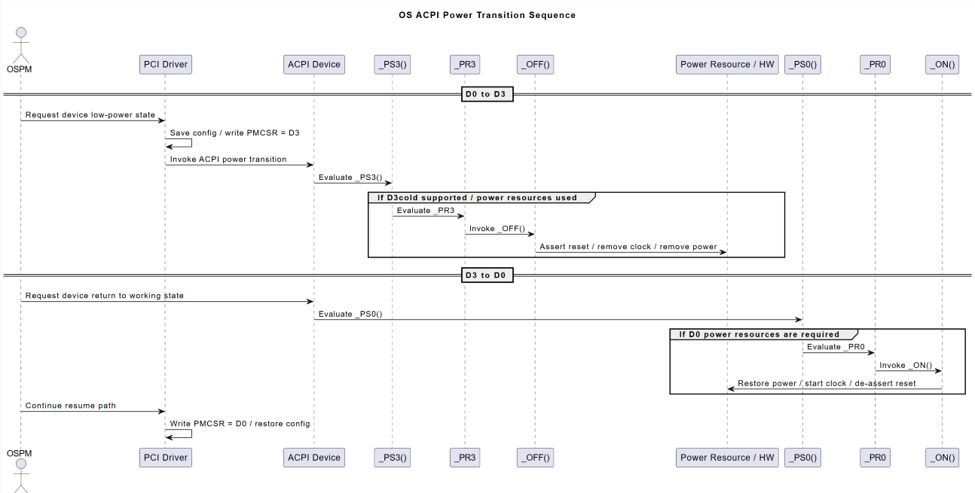
ACPI 的_PS0() 和 _PS3()
在 ACPI 的 ASL 里,_PS0() 和 _PS3() 是设备电源状态控制方法:
- _PS0():表示把设备切到 D0,也就是全开 / 工作状态。
- _PS3():表示把设备切到 D3,也就是低功耗 / 关闭状态(通常是 D3hot;如果平台还配合 _PR3 / _OFF,可能进一步到 D3cold)。
更直白一点:
- 设备要“开机能工作”时,OS/ACPI 可能调用 _PS0()
- 设备要“省电停用”时,OS/ACPI 可能调用 _PS3()
此外,类似的还有
- _PR0:声明设备处于 D0 时依赖哪些 power resources
- _PR3:声明设备进入 D3 路径 时依赖哪些 power resources
- _ON() / _OFF():真正控制 power resource 的上电/断电动作
例如,下图中设备需要从 D0 进入 D3,首先是操作系统提出要求,然后通过驱动,调用 ACPI 设备中的 _PS3()。到了这一步,设备就停止了工作。如果你的设备支持D3Cold(彻底断电),那么还会调用_PR3()获得依赖的 Power Resource。最后再调用_OFF() 进行断电。这样设备的供电就被完全切断了。
将设备从 D3唤醒的方法和上面的类似,首先调用_PS0()。如果设备支持 D3 Cold那么需要调用_PR0()获得相关 Power Resource,最后通过_On(),恢复供电或者 Clock 之类的。设备才能够正常的开始工作。
做一个 UEFI 下的 EasyX 图形库(6)
继续给 UEFI 下的 EasyX 增加功能,这次增加了颜色转换的几个函数
- HSVtoRGB(H, S, V)
- HSLtoRGB(H, S, L)
- RGBtoGRAY(Color)
- RGBtoHSV(Color, *H, *S, *V)
- RGBtoHSL(Color, *H, *S, *L)
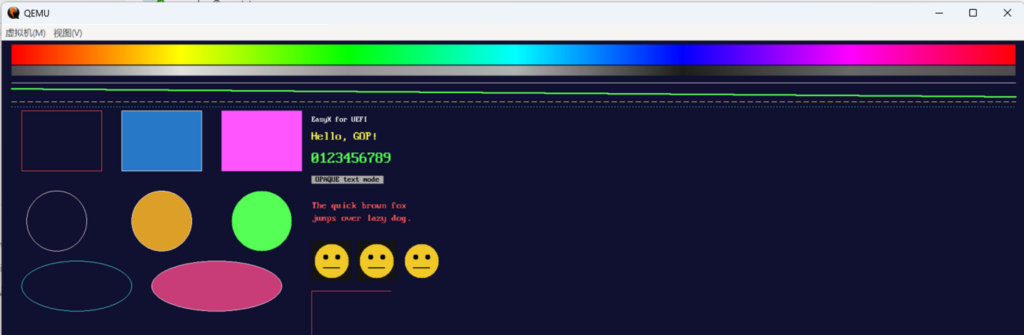
测试代码绘制彩虹条:
#include <Uefi.h>
#include <Library/UefiBootServicesTableLib.h>
#include <Library/UefiLib.h>
#include <Library/PrintLib.h>
#include "easyx.h"

/**
  程序入口。
**/
EFI_STATUS
EFIAPI
UefiMain (
  IN EFI_HANDLE        ImageHandle,
  IN EFI_SYSTEM_TABLE  *SystemTable
  )
{
  EFI_STATUS  Status;
  INT32       W;
  INT32       H;
  INT32       PenX;
  INT32       PenY;
  IMAGE       Sprite  = { 0, 0, NULL };   // 使用前必须清零
  IMAGE       Grabbed = { 0, 0, NULL };   // getimage 会读取 Buffer 判断是否需释放
  ExMessage   Msg;
  BOOLEAN     Running;
  UINTN       ColorIndex;
  CHAR8       StatusBuf[96];
  CONST COLORREF  Palette[] = {
    LIGHTRED, LIGHTGREEN, LIGHTCYAN, YELLOW, LIGHTMAGENTA, WHITE
  };

  //
  // 初始化绘图设备(跟随 GOP 最大分辨率模式)。
  //
  Status = initgraph (0, 0);
  if (EFI_ERROR (Status)) {
    Print (L"initgraph 失败: %r\n", Status);
    return Status;
  }

  W = getwidth ();
  H = getheight ();

  //
  // 批量绘图,减少刷新次数。
  //
  BeginBatchDraw ();

  //
  // 背景填充深蓝。
  //
  setbkcolor (RGB (16, 16, 48));
  cleardevice ();

  //
  // 颜色模型演示:顶部粗大 HSV 彩虹条 + 其灰度条(RGBtoGRAY)。
  //
  {
    INT32  Px;

    setlinestyle (PS_SOLID, 1);
    for (Px = 20; Px < W - 20; Px++) {
      INT32     Hue = (Px - 20) * 360 / (W - 40);
      COLORREF  Rainbow = HSVtoRGB (Hue % 360, 100, 100);

      setlinecolor (Rainbow);
      line (Px, 8, Px, 47);          // 彩虹条:40 像素高

      setlinecolor (RGBtoGRAY (Rainbow));
      line (Px, 50, Px, 69);         // 灰度条:20 像素高
    }
  }

  //
  // 直线:不同颜色/线宽/线型(下移,为彩虹条让位)。
  //
  setlinecolor (WHITE);
  setlinestyle (PS_SOLID, 1);
  line (20, 84, W - 20, 84);

  setlinecolor (LIGHTGREEN);
  setlinestyle (PS_SOLID, 3);
  line (20, 96, W - 20, 112);

  setlinecolor (YELLOW);
  setlinestyle (PS_DASH, 1);
  line (20, 122, W - 20, 122);

  setlinecolor (LIGHTCYAN);
  setlinestyle (PS_DOT, 1);
  line (20, 132, W - 20, 132);

  //
  // 矩形。
  //
  setlinestyle (PS_SOLID, 1);
  setlinecolor (LIGHTRED);
  rectangle (40, 140, 200, 260);

  setfillcolor (RGB (40, 120, 200));
  setlinecolor (WHITE);
  fillrectangle (240, 140, 400, 260);

  setfillcolor (LIGHTMAGENTA);
  solidrectangle (440, 140, 600, 260);

  //
  // 圆。
  //
  setlinecolor (WHITE);
  circle (110, 360, 60);

  setfillcolor (RGB (220, 160, 40));
  setlinecolor (WHITE);
  fillcircle (320, 360, 60);

  setfillcolor (LIGHTGREEN);
  solidcircle (520, 360, 60);

  //
  // 椭圆。
  //
  setlinecolor (LIGHTCYAN);
  ellipse (40, 440, 260, 540);

  setfillcolor (RGB (200, 60, 120));
  setlinecolor (WHITE);
  fillellipse (300, 440, 560, 540);

  //
  // 文字(P2):不同颜色/大小/背景模式。
  //
  settextcolor (WHITE);
  settextstyle (16, 8);
  outtextxy (620, 150, "EasyX for UEFI");

  settextcolor (YELLOW);
  settextstyle (24, 0);            // 高 24,宽按比例
  outtextxy (620, 180, "Hello, GOP!");

  settextcolor (LIGHTGREEN);
  settextstyle (32, 16);
  setbkmode (TRANSPARENT);
  outtextxy (620, 220, "0123456789");

  settextcolor (BLACK);
  setbkcolor (LIGHTGRAY);
  setbkmode (OPAQUE);
  settextstyle (16, 8);
  outtextxy (620, 270, " OPAQUE text mode ");

  setbkmode (TRANSPARENT);
  settextcolor (LIGHTRED);
  settextstyle (20, 10);
  outtextxy (620, 320, "The quick brown fox");
  outtextxy (620, 345, "jumps over lazy dog.");

  //
  // 图像(P3)。
  //
  // 1) 用 SetWorkingImage 把绘图重定向到内存图像,绘制一个“精灵”。
  //
  if (!EFI_ERROR (CreateImage (&Sprite, 80, 80))) {
    SetWorkingImage (&Sprite);

    setbkcolor (RGB (20, 20, 20));
    cleardevice ();
    setfillcolor (RGB (240, 200, 40));
    solidcircle (40, 40, 34);
    setfillcolor (BLACK);
    solidcircle (28, 32, 5);
    solidcircle (52, 32, 5);
    setlinecolor (BLACK);
    setlinestyle (PS_SOLID, 2);
    line (24, 54, 56, 54);

    SetWorkingImage (NULL);   // 恢复到屏幕

    // 2) 直接覆盖绘制到屏幕多个位置。
    putimage (620, 400, &Sprite);
    putimage (710, 400, &Sprite);

    // 3) 透明贴图:跳过图像四角的深灰背景色。
    putimagetrans (800, 400, &Sprite, RGB (20, 20, 20));
  }

  //
  // 4) getimage:抓取屏幕左上角一块区域,复制到别处。
  //
  if (!EFI_ERROR (getimage (&Grabbed, 40, 140, 160, 120))) {
    putimage (620, 500, &Grabbed);
    DeleteImage (&Grabbed);
  }

  DeleteImage (&Sprite);

  //
  // 高级图形(P5):底部一条演示带(先清出干净背景)。
  //
  {
    INT32  Y0 = H - 150;

    setfillcolor (RGB (16, 16, 48));
    solidrectangle (0, Y0 - 10, W - 1, Y0 + 100);

    // 圆角矩形(边框 + 填充)
    setlinestyle (PS_SOLID, 1);
    setlinecolor (WHITE);
    setfillcolor (RGB (40, 120, 200));
    fillroundrect (30, Y0, 150, Y0 + 90, 40, 40);

    // 扇形(吃豆人)
    setfillcolor (YELLOW);
    fillpie (170, Y0, 290, Y0 + 90, 35, 300);

    // 圆弧
    setlinecolor (LIGHTCYAN);
    arc (310, Y0, 430, Y0 + 90, 0, 200);

    // 多边形(三角形,边框 + 填充)
    setlinecolor (WHITE);
    setfillcolor (LIGHTGREEN);
    {
      POINT  Tri[3] = {
        { 450, Y0 + 90 },
        { 510, Y0      },
        { 570, Y0 + 90 }
      };
      fillpolygon (Tri, 3);
    }

    // 折线(锯齿)
    setlinecolor (LIGHTMAGENTA);
    setlinestyle (PS_SOLID, 2);
    {
      POINT  Zig[5] = {
        { 590, Y0 + 90 },
        { 610, Y0      },
        { 630, Y0 + 90 },
        { 650, Y0      },
        { 670, Y0 + 90 }
      };
      polyline (Zig, 5);
    }

    // 区域填充:先画空心矩形,再对内部 floodfill
    setlinestyle (PS_SOLID, 1);
    setlinecolor (WHITE);
    rectangle (700, Y0, 800, Y0 + 90);
    setfillcolor (RGB (220, 80, 160));
    floodfill (750, Y0 + 45, RGB (16, 16, 48));
  }

  //
  // 键盘操作提示。
  //
  setbkmode (TRANSPARENT);
  settextcolor (WHITE);
  settextstyle (16, 8);
  outtextxy (20, H - 24, "Arrow keys=draw, Space=color, ESC=exit");

  //
  // 一次性刷新并结束批量绘图。
  //
  EndBatchDraw ();

  //
  // 键盘交互循环(P4):方向键移动画笔绘线。
  //
  PenX       = W / 2;
  PenY       = H / 2;
  Running    = TRUE;
  ColorIndex = 0;
  while (Running) {
    INT32  NewX;
    INT32  NewY;

    getmessage (&Msg, EX_KEY);

    if (Msg.message != WM_KEYDOWN) {
      continue;
    }

    NewX = PenX;
    NewY = PenY;

    switch (Msg.vkcode) {
      case VK_LEFT:   NewX -= 8; break;
      case VK_RIGHT:  NewX += 8; break;
      case VK_UP:     NewY -= 8; break;
      case VK_DOWN:   NewY += 8; break;
      case VK_SPACE:  ColorIndex++; break;
      case VK_ESCAPE: Running = FALSE; break;
      default:        break;
    }

    if (!Running) {
      break;
    }

    //
    // 夹取到屏幕范围内。
    //
    if (NewX < 0) {
      NewX = 0;
    }

    if (NewY < 0) {
      NewY = 0;
    }

    if (NewX > W - 1) {
      NewX = W - 1;
    }

    if (NewY > H - 1) {
      NewY = H - 1;
    }

    //
    // 从旧位置到新位置画一段线。
    //
    setlinecolor (Palette[ColorIndex % (sizeof (Palette) / sizeof (Palette[0]))]);
    setlinestyle (PS_SOLID, 2);
    line (PenX, PenY, NewX, NewY);
    PenX = NewX;
    PenY = NewY;

    //
    // 底部显示当前画笔位置与按键(先用背景色清除旧文字)。
    //
    setfillcolor (RGB (16, 16, 48));
    solidrectangle (20, H - 48, 420, H - 28);
    AsciiSPrint (
      StatusBuf,
      sizeof (StatusBuf),
      "Pen: (%d, %d)  vkcode=0x%02x",
      PenX,
      PenY,
      Msg.vkcode
      );
    setbkmode (TRANSPARENT);
    settextcolor (LIGHTCYAN);
    settextstyle (16, 8);
    outtextxy (20, H - 46, StatusBuf);
  }

  closegraph ();

  //
  // 恢复文本控制台。
  //
  gST->ConOut->ClearScreen (gST->ConOut);
  Print (L"EasyX UEFI Demo 结束。分辨率: %d x %d\n", W, H);

  return EFI_SUCCESS;
}
效果如下:
完整的代码下载:
做一个 UEFI 下的 EasyX 图形库(5)
继续改进代码,增加了一些绘制扇形之类的函数。
示例代码:
/** @file
  EasyX UEFI 图形库演示程序(阶段 P0–P4)。

  先绘制静态场景(线/矩形/圆/椭圆/文字/图像),然后进入
  键盘交互:方向键移动“画笔”绘线,空格切换颜色,ESC 退出。
  本演示不依赖鼠标。
**/

#include <Uefi.h>
#include <Library/UefiBootServicesTableLib.h>
#include <Library/UefiLib.h>
#include <Library/PrintLib.h>
#include "easyx.h"

/**
  程序入口。
**/
EFI_STATUS
EFIAPI
UefiMain (
  IN EFI_HANDLE        ImageHandle,
  IN EFI_SYSTEM_TABLE  *SystemTable
  )
{
  EFI_STATUS  Status;
  INT32       W;
  INT32       H;
  INT32       PenX;
  INT32       PenY;
  IMAGE       Sprite  = { 0, 0, NULL };   // 使用前必须清零
  IMAGE       Grabbed = { 0, 0, NULL };   // getimage 会读取 Buffer 判断是否需释放
  ExMessage   Msg;
  BOOLEAN     Running;
  UINTN       ColorIndex;
  CHAR8       StatusBuf[96];
  CONST COLORREF  Palette[] = {
    LIGHTRED, LIGHTGREEN, LIGHTCYAN, YELLOW, LIGHTMAGENTA, WHITE
  };

  //
  // 初始化绘图设备(跟随 GOP 最大分辨率模式)。
  //
  Status = initgraph (0, 0);
  if (EFI_ERROR (Status)) {
    Print (L"initgraph 失败: %r\n", Status);
    return Status;
  }

  W = getwidth ();
  H = getheight ();

  //
  // 批量绘图,减少刷新次数。
  //
  BeginBatchDraw ();

  //
  // 背景填充深蓝。
  //
  setbkcolor (RGB (16, 16, 48));
  cleardevice ();

  //
  // 直线:不同颜色/线宽/线型。
  //
  setlinecolor (WHITE);
  setlinestyle (PS_SOLID, 1);
  line (20, 20, W - 20, 20);

  setlinecolor (LIGHTGREEN);
  setlinestyle (PS_SOLID, 3);
  line (20, 40, W - 20, 60);

  setlinecolor (YELLOW);
  setlinestyle (PS_DASH, 1);
  line (20, 80, W - 20, 80);

  setlinecolor (LIGHTCYAN);
  setlinestyle (PS_DOT, 1);
  line (20, 100, W - 20, 100);

  //
  // 矩形。
  //
  setlinestyle (PS_SOLID, 1);
  setlinecolor (LIGHTRED);
  rectangle (40, 140, 200, 260);

  setfillcolor (RGB (40, 120, 200));
  setlinecolor (WHITE);
  fillrectangle (240, 140, 400, 260);

  setfillcolor (LIGHTMAGENTA);
  solidrectangle (440, 140, 600, 260);

  //
  // 圆。
  //
  setlinecolor (WHITE);
  circle (110, 360, 60);

  setfillcolor (RGB (220, 160, 40));
  setlinecolor (WHITE);
  fillcircle (320, 360, 60);

  setfillcolor (LIGHTGREEN);
  solidcircle (520, 360, 60);

  //
  // 椭圆。
  //
  setlinecolor (LIGHTCYAN);
  ellipse (40, 440, 260, 540);

  setfillcolor (RGB (200, 60, 120));
  setlinecolor (WHITE);
  fillellipse (300, 440, 560, 540);

  //
  // 文字(P2):不同颜色/大小/背景模式。
  //
  settextcolor (WHITE);
  settextstyle (16, 8);
  outtextxy (620, 150, "EasyX for UEFI");

  settextcolor (YELLOW);
  settextstyle (24, 0);            // 高 24,宽按比例
  outtextxy (620, 180, "Hello, GOP!");

  settextcolor (LIGHTGREEN);
  settextstyle (32, 16);
  setbkmode (TRANSPARENT);
  outtextxy (620, 220, "0123456789");

  settextcolor (BLACK);
  setbkcolor (LIGHTGRAY);
  setbkmode (OPAQUE);
  settextstyle (16, 8);
  outtextxy (620, 270, " OPAQUE text mode ");

  setbkmode (TRANSPARENT);
  settextcolor (LIGHTRED);
  settextstyle (20, 10);
  outtextxy (620, 320, "The quick brown fox");
  outtextxy (620, 345, "jumps over lazy dog.");

  //
  // 图像(P3)。
  //
  // 1) 用 SetWorkingImage 把绘图重定向到内存图像,绘制一个“精灵”。
  //
  if (!EFI_ERROR (CreateImage (&Sprite, 80, 80))) {
    SetWorkingImage (&Sprite);

    setbkcolor (RGB (20, 20, 20));
    cleardevice ();
    setfillcolor (RGB (240, 200, 40));
    solidcircle (40, 40, 34);
    setfillcolor (BLACK);
    solidcircle (28, 32, 5);
    solidcircle (52, 32, 5);
    setlinecolor (BLACK);
    setlinestyle (PS_SOLID, 2);
    line (24, 54, 56, 54);

    SetWorkingImage (NULL);   // 恢复到屏幕

    // 2) 直接覆盖绘制到屏幕多个位置。
    putimage (620, 400, &Sprite);
    putimage (710, 400, &Sprite);

    // 3) 透明贴图:跳过图像四角的深灰背景色。
    putimagetrans (800, 400, &Sprite, RGB (20, 20, 20));
  }

  //
  // 4) getimage:抓取屏幕左上角一块区域,复制到别处。
  //
  if (!EFI_ERROR (getimage (&Grabbed, 40, 140, 160, 120))) {
    putimage (620, 500, &Grabbed);
    DeleteImage (&Grabbed);
  }

  DeleteImage (&Sprite);

  //
  // 高级图形(P5):底部一条演示带(先清出干净背景)。
  //
  {
    INT32  Y0 = H - 150;

    setfillcolor (RGB (16, 16, 48));
    solidrectangle (0, Y0 - 10, W - 1, Y0 + 100);

    // 圆角矩形(边框 + 填充)
    setlinestyle (PS_SOLID, 1);
    setlinecolor (WHITE);
    setfillcolor (RGB (40, 120, 200));
    fillroundrect (30, Y0, 150, Y0 + 90, 40, 40);

    // 扇形(吃豆人)
    setfillcolor (YELLOW);
    fillpie (170, Y0, 290, Y0 + 90, 35, 300);

    // 圆弧
    setlinecolor (LIGHTCYAN);
    arc (310, Y0, 430, Y0 + 90, 0, 200);

    // 多边形(三角形,边框 + 填充)
    setlinecolor (WHITE);
    setfillcolor (LIGHTGREEN);
    {
      POINT  Tri[3] = {
        { 450, Y0 + 90 },
        { 510, Y0      },
        { 570, Y0 + 90 }
      };
      fillpolygon (Tri, 3);
    }

    // 折线(锯齿)
    setlinecolor (LIGHTMAGENTA);
    setlinestyle (PS_SOLID, 2);
    {
      POINT  Zig[5] = {
        { 590, Y0 + 90 },
        { 610, Y0      },
        { 630, Y0 + 90 },
        { 650, Y0      },
        { 670, Y0 + 90 }
      };
      polyline (Zig, 5);
    }

    // 区域填充:先画空心矩形,再对内部 floodfill
    setlinestyle (PS_SOLID, 1);
    setlinecolor (WHITE);
    rectangle (700, Y0, 800, Y0 + 90);
    setfillcolor (RGB (220, 80, 160));
    floodfill (750, Y0 + 45, RGB (16, 16, 48));
  }

  //
  // 键盘操作提示。
  //
  setbkmode (TRANSPARENT);
  settextcolor (WHITE);
  settextstyle (16, 8);
  outtextxy (20, H - 24, "Arrow keys=draw, Space=color, ESC=exit");

  //
  // 一次性刷新并结束批量绘图。
  //
  EndBatchDraw ();

  //
  // 键盘交互循环(P4):方向键移动画笔绘线。
  //
  PenX       = W / 2;
  PenY       = H / 2;
  Running    = TRUE;
  ColorIndex = 0;
  while (Running) {
    INT32  NewX;
    INT32  NewY;

    getmessage (&Msg, EX_KEY);

    if (Msg.message != WM_KEYDOWN) {
      continue;
    }

    NewX = PenX;
    NewY = PenY;

    switch (Msg.vkcode) {
      case VK_LEFT:   NewX -= 8; break;
      case VK_RIGHT:  NewX += 8; break;
      case VK_UP:     NewY -= 8; break;
      case VK_DOWN:   NewY += 8; break;
      case VK_SPACE:  ColorIndex++; break;
      case VK_ESCAPE: Running = FALSE; break;
      default:        break;
    }

    if (!Running) {
      break;
    }

    //
    // 夹取到屏幕范围内。
    //
    if (NewX < 0) {
      NewX = 0;
    }

    if (NewY < 0) {
      NewY = 0;
    }

    if (NewX > W - 1) {
      NewX = W - 1;
    }

    if (NewY > H - 1) {
      NewY = H - 1;
    }

    //
    // 从旧位置到新位置画一段线。
    //
    setlinecolor (Palette[ColorIndex % (sizeof (Palette) / sizeof (Palette[0]))]);
    setlinestyle (PS_SOLID, 2);
    line (PenX, PenY, NewX, NewY);
    PenX = NewX;
    PenY = NewY;

    //
    // 底部显示当前画笔位置与按键(先用背景色清除旧文字)。
    //
    setfillcolor (RGB (16, 16, 48));
    solidrectangle (20, H - 48, 420, H - 28);
    AsciiSPrint (
      StatusBuf,
      sizeof (StatusBuf),
      "Pen: (%d, %d)  vkcode=0x%02x",
      PenX,
      PenY,
      Msg.vkcode
      );
    setbkmode (TRANSPARENT);
    settextcolor (LIGHTCYAN);
    settextstyle (16, 8);
    outtextxy (20, H - 46, StatusBuf);
  }

  closegraph ();

  //
  // 恢复文本控制台。
  //
  gST->ConOut->ClearScreen (gST->ConOut);
  Print (L"EasyX UEFI Demo 结束。分辨率: %d x %d\n", W, H);

  return EFI_SUCCESS;
}
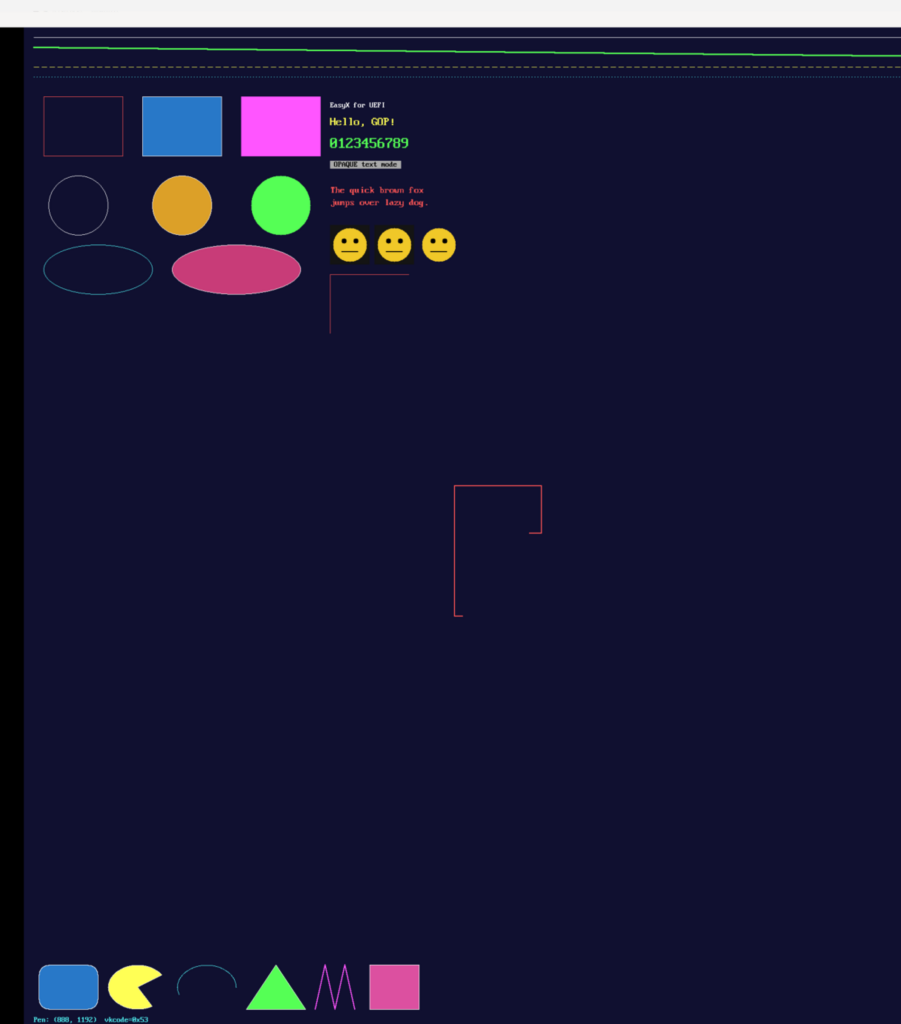
代码运行结果(新增的在最下面)
完整代码和编译后的 EFI下载:
做一个 UEFI 下的 EasyX 图形库(4)
这个版本加入了Easxy的键盘的函数。经过研究,我放弃了在 EasyX 中的鼠标支持,因此多次测试下来感觉一般的UEFI 使用环境下并不能很好的支持键盘。
编写测试代码实现下面的功能:
| 按键 | 功能 |
| 方向键 ↑↓←→ | 画笔从当前位置向该方向移动 8 像素,并画出一段连线(像涂鸦板) |
| 空格 | 之后画的线换一种颜色(红→绿→青→黄→品红→白循环) |
| ESC | 退出图形界面,回到文本控制台并打印 EasyX UEFI Demo 结束… |
| 任意移动后 | 屏幕底部实时显示 Pen: (x, y) vkcode=0x.. |
完整代码:
#include <Uefi.h>
#include <Library/UefiBootServicesTableLib.h>
#include <Library/UefiLib.h>
#include <Library/PrintLib.h>
#include "easyx.h"

/**
  程序入口。
**/
EFI_STATUS
EFIAPI
UefiMain (
  IN EFI_HANDLE        ImageHandle,
  IN EFI_SYSTEM_TABLE  *SystemTable
  )
{
  EFI_STATUS  Status;
  INT32       W;
  INT32       H;
  INT32       PenX;
  INT32       PenY;
  IMAGE       Sprite  = { 0, 0, NULL };   // 使用前必须清零
  IMAGE       Grabbed = { 0, 0, NULL };   // getimage 会读取 Buffer 判断是否需释放
  ExMessage   Msg;
  BOOLEAN     Running;
  UINTN       ColorIndex;
  CHAR8       StatusBuf[96];
  CONST COLORREF  Palette[] = {
    LIGHTRED, LIGHTGREEN, LIGHTCYAN, YELLOW, LIGHTMAGENTA, WHITE
  };

  //
  // 初始化绘图设备(跟随 GOP 最大分辨率模式)。
  //
  Status = initgraph (0, 0);
  if (EFI_ERROR (Status)) {
    Print (L"initgraph 失败: %r\n", Status);
    return Status;
  }

  W = getwidth ();
  H = getheight ();

  //
  // 批量绘图,减少刷新次数。
  //
  BeginBatchDraw ();

  //
  // 背景填充深蓝。
  //
  setbkcolor (RGB (16, 16, 48));
  cleardevice ();

  //
  // 直线:不同颜色/线宽/线型。
  //
  setlinecolor (WHITE);
  setlinestyle (PS_SOLID, 1);
  line (20, 20, W - 20, 20);

  setlinecolor (LIGHTGREEN);
  setlinestyle (PS_SOLID, 3);
  line (20, 40, W - 20, 60);

  setlinecolor (YELLOW);
  setlinestyle (PS_DASH, 1);
  line (20, 80, W - 20, 80);

  setlinecolor (LIGHTCYAN);
  setlinestyle (PS_DOT, 1);
  line (20, 100, W - 20, 100);

  //
  // 矩形。
  //
  setlinestyle (PS_SOLID, 1);
  setlinecolor (LIGHTRED);
  rectangle (40, 140, 200, 260);

  setfillcolor (RGB (40, 120, 200));
  setlinecolor (WHITE);
  fillrectangle (240, 140, 400, 260);

  setfillcolor (LIGHTMAGENTA);
  solidrectangle (440, 140, 600, 260);

  //
  // 圆。
  //
  setlinecolor (WHITE);
  circle (110, 360, 60);

  setfillcolor (RGB (220, 160, 40));
  setlinecolor (WHITE);
  fillcircle (320, 360, 60);

  setfillcolor (LIGHTGREEN);
  solidcircle (520, 360, 60);

  //
  // 椭圆。
  //
  setlinecolor (LIGHTCYAN);
  ellipse (40, 440, 260, 540);

  setfillcolor (RGB (200, 60, 120));
  setlinecolor (WHITE);
  fillellipse (300, 440, 560, 540);

  //
  // 文字(P2):不同颜色/大小/背景模式。
  //
  settextcolor (WHITE);
  settextstyle (16, 8);
  outtextxy (620, 150, "EasyX for UEFI");

  settextcolor (YELLOW);
  settextstyle (24, 0);            // 高 24,宽按比例
  outtextxy (620, 180, "Hello, GOP!");

  settextcolor (LIGHTGREEN);
  settextstyle (32, 16);
  setbkmode (TRANSPARENT);
  outtextxy (620, 220, "0123456789");

  settextcolor (BLACK);
  setbkcolor (LIGHTGRAY);
  setbkmode (OPAQUE);
  settextstyle (16, 8);
  outtextxy (620, 270, " OPAQUE text mode ");

  setbkmode (TRANSPARENT);
  settextcolor (LIGHTRED);
  settextstyle (20, 10);
  outtextxy (620, 320, "The quick brown fox");
  outtextxy (620, 345, "jumps over lazy dog.");

  //
  // 图像(P3)。
  //
  // 1) 用 SetWorkingImage 把绘图重定向到内存图像,绘制一个“精灵”。
  //
  if (!EFI_ERROR (CreateImage (&Sprite, 80, 80))) {
    SetWorkingImage (&Sprite);

    setbkcolor (RGB (20, 20, 20));
    cleardevice ();
    setfillcolor (RGB (240, 200, 40));
    solidcircle (40, 40, 34);
    setfillcolor (BLACK);
    solidcircle (28, 32, 5);
    solidcircle (52, 32, 5);
    setlinecolor (BLACK);
    setlinestyle (PS_SOLID, 2);
    line (24, 54, 56, 54);

    SetWorkingImage (NULL);   // 恢复到屏幕

    // 2) 直接覆盖绘制到屏幕多个位置。
    putimage (620, 400, &Sprite);
    putimage (710, 400, &Sprite);

    // 3) 透明贴图:跳过图像四角的深灰背景色。
    putimagetrans (800, 400, &Sprite, RGB (20, 20, 20));
  }

  //
  // 4) getimage:抓取屏幕左上角一块区域,复制到别处。
  //
  if (!EFI_ERROR (getimage (&Grabbed, 40, 140, 160, 120))) {
    putimage (620, 500, &Grabbed);
    DeleteImage (&Grabbed);
  }

  DeleteImage (&Sprite);

  //
  // 键盘操作提示。
  //
  setbkmode (TRANSPARENT);
  settextcolor (WHITE);
  settextstyle (16, 8);
  outtextxy (20, H - 24, "Arrow keys=draw, Space=color, ESC=exit");

  //
  // 一次性刷新并结束批量绘图。
  //
  EndBatchDraw ();

  //
  // 键盘交互循环(P4):方向键移动画笔绘线。
  //
  PenX       = W / 2;
  PenY       = H / 2;
  Running    = TRUE;
  ColorIndex = 0;
  while (Running) {
    INT32  NewX;
    INT32  NewY;

    getmessage (&Msg, EX_KEY);

    if (Msg.message != WM_KEYDOWN) {
      continue;
    }

    NewX = PenX;
    NewY = PenY;

    switch (Msg.vkcode) {
      case VK_LEFT:   NewX -= 8; break;
      case VK_RIGHT:  NewX += 8; break;
      case VK_UP:     NewY -= 8; break;
      case VK_DOWN:   NewY += 8; break;
      case VK_SPACE:  ColorIndex++; break;
      case VK_ESCAPE: Running = FALSE; break;
      default:        break;
    }

    if (!Running) {
      break;
    }

    //
    // 夹取到屏幕范围内。
    //
    if (NewX < 0) {
      NewX = 0;
    }

    if (NewY < 0) {
      NewY = 0;
    }

    if (NewX > W - 1) {
      NewX = W - 1;
    }

    if (NewY > H - 1) {
      NewY = H - 1;
    }

    //
    // 从旧位置到新位置画一段线。
    //
    setlinecolor (Palette[ColorIndex % (sizeof (Palette) / sizeof (Palette[0]))]);
    setlinestyle (PS_SOLID, 2);
    line (PenX, PenY, NewX, NewY);
    PenX = NewX;
    PenY = NewY;

    //
    // 底部显示当前画笔位置与按键(先用背景色清除旧文字)。
    //
    setfillcolor (RGB (16, 16, 48));
    solidrectangle (20, H - 48, 420, H - 28);
    AsciiSPrint (
      StatusBuf,
      sizeof (StatusBuf),
      "Pen: (%d, %d)  vkcode=0x%02x",
      PenX,
      PenY,
      Msg.vkcode
      );
    setbkmode (TRANSPARENT);
    settextcolor (LIGHTCYAN);
    settextstyle (16, 8);
    outtextxy (20, H - 46, StatusBuf);
  }

  closegraph ();

  //
  // 恢复文本控制台。
  //
  gST->ConOut->ClearScreen (gST->ConOut);
  Print (L"EasyX UEFI Demo 结束。分辨率: %d x %d\n", W, H);

  return EFI_SUCCESS;
}
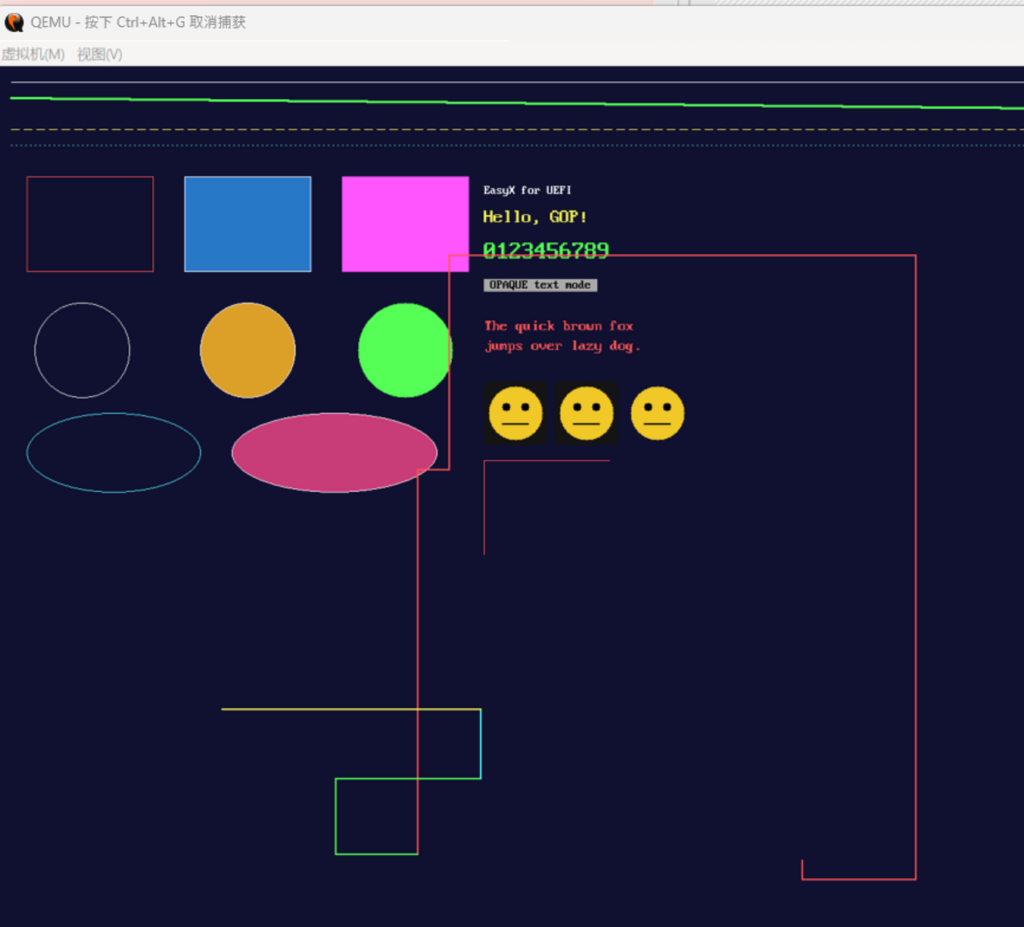
运行结果(中间的线段是运行时我使用方向键绘制的)
有兴趣的朋友可以试试。